The OCR Illusion
Ask most enterprise buyers what they need to "digitize documents," and they'll say "OCR." The term has become shorthand for the entire problem of turning paper and PDFs into usable data. It's also misleading in a way that systematically undermines automation projects.
Optical character recognition is a narrow, mature technology: it converts pixels into characters. It does not know that a number in the top-right corner of a form is an invoice total, that a stamp overlapping a signature line invalidates a document, or that a table's column headers apply to every row beneath them. Enterprises don't actually want characters — they want structured, trustworthy facts they can act on: amounts, dates, parties, obligations, diagnoses, clauses. That gap between "read the text" and "understand the document" is where many real-world document automation projects run into trouble, and it's the gap this piece is about closing.
What OCR Really Does (and Doesn't)
At its core, OCR performs character recognition: it detects glyphs in an image and maps them to text. Modern engines do this well on clean, printed, single-language pages. But character recognition is not document understanding. OCR has no concept of a field, a table, a signature block, or a relationship between two pieces of text on the page. It doesn't know that "Total Due" and the number three lines below it are connected, or that a checkbox is checked.
This is why classic pipelines bolt rule-based logic onto OCR output: regex patterns to find dates, keyword proximity to guess which number is the subtotal, template matching for known form layouts. That works until the document deviates even slightly from the template — a new vendor's invoice, a rotated scan, a form with an extra column. The downstream failure mode is familiar to anyone who has run a document-processing pipeline in production: the OCR text is fine, but the extracted "total" is actually the tax line, because the rule that located it had no real understanding of what it was looking at. Document understanding requires reasoning about layout, semantics, and context — not just characters.
The Real-World Document Zoo
Enterprise "documents" are not one thing. A single back office might handle invoices and receipts with wildly inconsistent layouts, passports and driver's licenses with security features and fixed but country-specific fields, tax forms with dense multi-column layouts, medical records mixing typed notes with handwritten annotations, insurance claims bundling forms, photos, and adjuster notes, research papers with citations and figures, contracts with nested clauses and cross-references, ordinary emails, handwritten field notes, free-floating tables, and engineering drawings where the "text" is annotations scattered across a technical diagram.
Each of these has a different information architecture. An invoice is a semi-structured form with a header, line-item table, and totals block. A passport is a fixed-layout ID document with an OCR-optimized machine-readable zone. A contract is largely unstructured prose where the important content is relationships between clauses, not fields. A medical record might be a scanned fax of a typed note with a handwritten signature and a stamp. Trying to force all of these through one generic "extract the fields" model is why enterprise document AI rollouts often stall after the pilot: the model that nailed invoices falls apart on medical records, and the extraction schema that worked for tax forms is meaningless for a contract. Document diversity isn't a detail to handle later — it's the central design constraint — and it's a big part of why healthcare claims and government casework, two document-heavy workflows we spend a lot of time on, are such unforgiving test beds for this problem: both bundle several of the hardest document types above into a single case file.
Why Documents Are Hard: Layouts, Languages, and Noise
Setting document type aside, the raw inputs themselves are frequently hostile. Layouts range from clean single-column text to multi-column forms, tables nested inside tables, and free-form annotations scattered around a diagram. Enterprises operating internationally deal with multilingual text, sometimes multiple languages on the same page, in different scripts and reading directions. Handwriting — from a doctor's note to a customer's signature to a warehouse worker's inventory tally — remains one of the hardest recognition problems because it doesn't follow the character shapes any OCR model was primarily trained on.
Then there's the physical reality of enterprise documents: stamps and signatures that visually overlap the text they're meant to authenticate, poor-quality scans and faxes with noise and low contrast, pages photographed at an angle or rotated 90 or 180 degrees, and content that mixes dense text blocks with images, logos, and diagrams on the same page. Any one of these can silently break a pipeline built and tested only on clean sample data. A model that hits high accuracy on a curated benchmark set can fail badly the moment it meets a crooked, coffee-stained fax of a handwritten form — and in production, that's usually the document that mattered most.
Anatomy of a Modern Document AI Pipeline
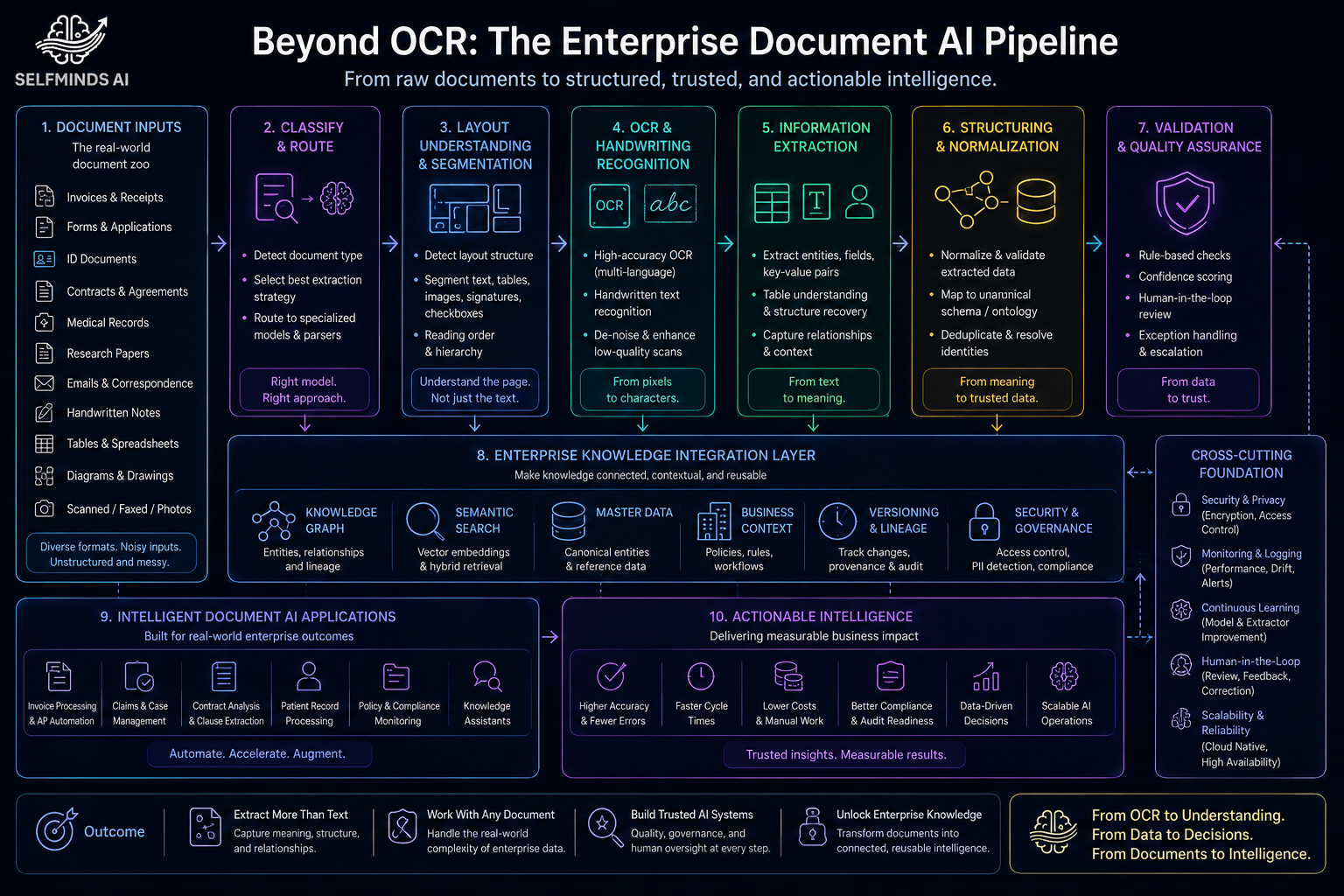
Because no single step can handle this range of complexity, production-grade document AI is typically built as a pipeline of specialized stages rather than one black-box model.
Document classification comes first: identifying whether a page is an invoice, a passport, a contract, or something else, since everything downstream depends on knowing what kind of document is in front of the system.
Page segmentation follows — essentially splitting one large file into logical chunks, the way a bundled insurance claim gets separated into the form, the photos, and the adjuster's letter.
Layout detection then maps the visual structure of each page: where the tables are, where the header and footer sit, which blocks are running text versus form fields.
OCR still has a job here — extracting the raw text within each detected region — but it's now scoped and contextualized rather than run blindly over the whole page.
VLM reasoning sits on top. A vision-language model (VLM) is an AI model trained to interpret images and text together rather than text alone, so it can reason about what the layout and text actually mean in combination: which cell in a table is the total, whether a stamp indicates approval or rejection, what a handwritten margin note is referring to.
Entity extraction turns that reasoning into named fields — invoice number, patient diagnosis code, contract effective date — and validation checks those fields against business rules, cross-references, and plausibility constraints (does the tax amount make arithmetic sense given the subtotal and rate?).
Finally, the pipeline produces structured output, often normalized into a schema or knowledge graph that links entities across documents — connecting an invoice to its purchase order, or a claim to the policy it references — so the output is usable by downstream systems, not just readable by a human. This is the same staged architecture — classify, segment, detect layout, ground, reason, extract, validate — we've converged on while building Intelligent Document AI, and it's a design choice worth flagging: none of these stages is individually exotic, but skipping one is usually where a pipeline starts silently failing in production.
The Role of Vision-Language Models
The biggest architectural shift in document AI over the past few years is the move from "OCR text plus rules" to VLMs that reason over the image and the text together. A VLM doesn't just receive a string of extracted characters — it sees the page: where a number sits relative to a label, whether a table cell is merged, whether a stamp overlaps a signature.
The evidence for this shift is real but comes with important caveats. A Firstsource industry whitepaper reports that even a lightweight OCR-free VLM (DONUT) exceeds traditional OCR accuracy on complex documents. Industry analysis from Docsumo goes further, arguing that general-purpose VLMs such as InternVL2, Qwen2.5-VL, and GPT-4V now outperform specialized document models on complex layout tasks, which removes the need for a distinct OCR step and cuts down on the error propagation that happens when mistakes in one pipeline stage compound in the next. That's a meaningful claim, but it doesn't hold uniformly. A NeurIPS 2024 benchmarks-track paper testing long, multi-page real-world documents (MMLongBench-Doc) found that even the strongest VLM, GPT-4o, reached only 44.9% F1, and that most other large VLMs actually underperformed simple LLMs fed lossy OCR text — meaning the VLM advantage shrinks or reverses once documents get long and context-heavy. A separate arXiv preprint on OCR pipelines (Qianfan-OCR) adds another qualifier: general-purpose VLMs often carry higher inference costs and underperform specialized systems on structured parsing tasks that demand precise layout preservation, even as traditional two-stage OCR pipelines suffer their own inter-stage error propagation. The honest synthesis is that VLMs clearly outperform brittle OCR-plus-rules pipelines on layout-heavy, single-page benchmarks, but the size of that advantage depends heavily on whether the VLM is purpose-built for documents, and it can evaporate on long, dense, multi-page files where cost and context length become limiting factors.
What VLMs add, when they work, is contextual reasoning that OCR fundamentally cannot provide: understanding that a stamp changes the meaning of the field it covers, that a table's totals row should reconcile with the line items above it, or that a checkbox's visual state — not any text near it — determines the answer to a question.
A note on the evidence in the rest of this piece: outside of the peer-reviewed NeurIPS MMLongBench-Doc study and the ICLR-accepted PostAlign grounding work cited below, most of the specific figures come from recent arXiv preprints that haven't yet been peer-reviewed or validated at large-scale production volume. They're directionally consistent with what practitioners report, but they should be read as early research signals rather than settled facts.
Agentic AI: Orchestrating Specialized Models
If a single VLM's performance depends so heavily on document type and length, the natural next step is not to find one model that does everything, but to build a system that routes each document — or even each page — to the tool best suited to it. This is the case for agentic orchestration: an agent layer that classifies incoming documents and dispatches them to specialized extraction models, prompts, or pipelines rather than funneling everything through one monolithic model.
The evidence here is genuinely mixed, which is itself the important lesson. On the positive side, a study benchmarking four different orchestration architectures on 10,000 SEC filings found that a reflexive, self-correcting multi-agent architecture achieved the highest field-level accuracy (an F1 of 0.943), outperforming a simple sequential single-pass baseline — but at 2.3 times the computational cost. That pattern shows up elsewhere too: Amazon's own applied research on agentic document intelligence, IDP Accelerator, replaced deterministic compliance-checking logic with an LLM-driven, self-correcting validation module and reports a production deployment at a healthcare provider reaching 98% classification accuracy and an 80% reduction in processing time — a concrete data point on where the added coordination cost of agentic orchestration actually pays for itself. A keyphrase-extraction study (MAPEX) found a similar pattern in a narrower domain: a multi-stage pipeline adapting to document length and model backbone reliably beat standard single-pass prompting across six benchmarks.
But orchestration is not a free win. A large-scale audit of multi-agent LLM systems, accepted at NeurIPS 2025's Datasets and Benchmarks Track, analyzed over 150 tasks across seven popular multi-agent frameworks with expert human annotators and found that performance gains from adding agents remain minimal compared to single-agent baselines — some widely-used frameworks failed on the large majority of tasks attempted. The study catalogued 14 distinct, recurring failure modes, clustered into poor task specification, agents talking past or misunderstanding each other, and inadequate verification of intermediate outputs — In document AI pipelines, this plays out when a downstream agent trusts what the upstream agent extracted — without ever verifying it against the original document. Adding agents and roles doesn't automatically add accuracy; it can just add more places for errors to compound, especially when coordination and communication design aren't matched to the task and the underlying model's actual capabilities.
The practical takeaway for document AI is that orchestration should route documents to specialized models because different document types genuinely need different handling — a passport's fixed-field extraction is a different problem from a contract's clause-level reasoning — but the orchestration layer itself needs to be simple enough, and the underlying models capable enough, that added coordination doesn't introduce new failure modes. Orchestration buys accuracy on complex, high-value document sets; it needs to be weighed, document type by document type, against its cost and complexity overhead rather than adopted as an unconditional default.
Making It Production-Ready
Accuracy on a benchmark is not the same as reliability in production, and the gap between the two is where most document AI investments are won or lost.
The cost baseline. It's worth remembering what manual document handling actually costs, because it sets the bar automation has to clear. A commissioned Parseur survey puts the broad labor-cost baseline at an average of $28,500 per employee annually spent on manual data entry, and ResolvePay's breakdown adds the underlying mechanism: accounts payable clerks process roughly five manual invoices per hour (about 12 minutes each) by hand. Per-document estimates vary by category: a Docuclipper analysis of financial pre-accounting documents puts manual data entry costs at $7–10 per document, with error rates up to 4%. Costs run higher elsewhere: Infrrd cites the Level Research Payables Insight Report figure of $15.97 per manually processed invoice, and the CAQH Index finding that a manual healthcare claims-status inquiry costs $12–16 per transaction. The pattern across these sources is the same — the automatable cost is real and substantial, even though the exact figure depends heavily on what's being processed.
Confidence estimation and human-in-the-loop review. No document AI system should present every extracted field with equal certainty. Confidence scoring lets a system flag low-certainty extractions for review rather than silently shipping a wrong number downstream — it's the single design principle we've found hardest to retrofit after the fact and easiest to build in from the start. The case for pairing this with human review is promising, though it's worth being honest about what kind of evidence backs it: a mix of industry case studies and early academic research, not a large body of peer-reviewed studies converging on one number. In wealth management, OCBC's own 2025 annual report describes how Bank of Singapore's Source of Wealth Assistant — an agentic AI tool built with human-in-the-loop controls — cut source-of-wealth report preparation from up to ten days down to about an hour. Industry case studies compiled by Parseur report similar gains elsewhere: human-in-the-loop implementations pushing accuracy up to 99.9% and throughput up to 5x, including an insurer processing claims near real time while still keeping a human reviewer in the loop for transparency. An academic ablation study (MADP) adds a mechanistic layer: adding human-corrected feedback on top of an automated validator raised accuracy from 92.5% to 98.5% in the study's tests. And a separate paper on legal discovery shows that review doesn't need to touch every document to work — a targeted "human-on-the-loop" approach that escalated only about 24% of documents flagged as uncertain still cut a policy-violation-rate metric by 61%, indicating that selective, risk-based review can capture much of the benefit of full manual review at a fraction of the reviewer time.
Hallucination prevention through grounding. A VLM that reasons freely over a page can also confidently invent a field value that isn't actually on the page — a serious risk when the output feeds a financial or legal system. Grounding the model's output to the specific bounding box or region it's reading from, rather than letting it reason over the whole image unconstrained, is one of the more effective known mitigations: one arXiv study (GroundSight) found that grounding outputs to the relevant region cut the hallucination rate from 65.79% to 13.88% and improved visual question-answering accuracy by 3.45 points. A complementary approach (PostAlign) treats grounding as a corrective lens applied after generation, catching and fixing hallucinated content rather than only constraining it up front. In applied financial-document work from a Singapore bank's AI team, accepted at ACL 2026's industry track, a pipeline that grounds compact VLM extraction to retrieved, page-localized sections raised field-level accuracy by up to 31.9 percentage points over direct whole-document extraction — with page-level retrieval identified as the single largest driver of that gain — and this didn't just improve reliability, it let every extracted value be traced back to the exact page and region it came from, which is precisely what makes human-in-the-loop verification practical at scale, since a reviewer can check a claim against its source region in seconds rather than re-reading the whole document. That said, grounding isn't a silver bullet: a study on medical report extraction (MedRepBench) found that OCR-driven pipelines remain vulnerable to cascading errors even with grounding assistance, and that recall improvements from grounding were inconsistent across different fields — a reminder that this is an active area of research, not a solved problem.
Evaluation and scalability. Enterprise deployments need evaluation metrics that go beyond raw field accuracy — tracking precision and recall per field type, escalation rates, and end-to-end throughput, since a system that's accurate on average but wildly inconsistent on one critical field (say, dosage amounts on a medical record) is more dangerous than one with uniformly moderate accuracy. And scalability means the pipeline has to hold up not just on the clean sample documents used for a proof of concept, but on the rotated scans, mixed languages, and handwritten margin notes that show up once a system is actually running against live enterprise volume.
Where Document AI Is Headed
The shift underway in document AI is a shift from character recognition to reasoning. OCR isn't going away — text still has to be read off a page — but it's becoming one component inside a larger system that classifies documents, understands layout, reasons visually about tables and stamps, extracts entities with traceable provenance, and routes different document types to the tools best suited to them. The evidence assembled here is mixed rather than uniform: VLMs beat naive OCR-plus-rules pipelines on many layout-heavy documents but can lose that edge on long, dense files; orchestration helps on complex, high-value cases but adds cost and new failure modes of its own. What is consistent across the research is the conclusion that no single technique — not VLMs, not agentic orchestration, not grounding — is a universal fix on its own. Each helps most when matched to the right document type and paired with confidence estimation and human review for the cases that matter most.
The pipelines with the strongest evidence behind them tend to be more specialized, not more monolithic: smaller, purpose-built models routed by an orchestration layer, grounded outputs that a human can verify in seconds rather than minutes, and evaluation that tracks where systems fail, not just how often they succeed on average. The enterprises getting real value out of document AI today aren't the ones chasing a single model to rule every document type — they're the ones building systems that know which tool to use, and when to ask a person.
This piece is part of SelfMinds AI's Living Intelligence series on building enterprise AI systems that learn, reason, and hold up in production.
References
We link directly to primary sources and label each entry's review status — peer-reviewed venue, company research publication, or unreviewed preprint — since these carry meaningfully different evidentiary weight.
VLMs vs. OCR-plus-rules
Cost of manual document handling
Human-in-the-loop review
Grounding and hallucination prevention
Agentic orchestration
- 10,000 SEC filings, orchestration-architecture benchmark (arXiv, 2026) — preprint, submitted March 2026 (NYU)
- IDP Accelerator, agentic document intelligence (Amazon Science, 2026) — company research publication, production deployment reported
- MAPEX, keyphrase extraction (arXiv, 2025) — preprint
- Why Do Multi-Agent LLM Systems Fail? (NeurIPS 2025, Datasets and Benchmarks Track) — peer-reviewed; UC Berkeley, 1,600+ annotated traces across 7 frameworks
SelfMinds AI builds intelligent document processing pipelines for healthcare, finance, and enterprise operations — from classification through grounded extraction, validation, and human-in-the-loop review. If your document workflows are breaking on edge cases, we can help.
Discuss Your Document AI Project →
Continue Exploring — Living Intelligence Series